What Is Video Content Creation? Stages, Formats and Gear

Video content creation is the planned process of developing, recording, editing and distributing moving-image material for a clear purpose such as education, marketing or entertainment.
You might already have a phone full of clips, a customer asking for a demonstration, and no clear idea of what to publish. The missing piece usually isn't another camera. It's a repeatable way to turn a real customer question into something useful, then decide whether it worked.
What Video Content Creation Covers
Video content creation includes everything needed to take an idea from an initial question to a published, measurable piece of communication. Think of it as running a kitchen rather than cooking a single dish: the camera is the stove, but you still need a recipe, preparation, service, and feedback.
Say a Jenks shop owner keeps hearing that a product looks difficult to assemble. Recording someone opening the box produces footage. Planning a demonstration that shows the awkward steps, answers the question, and directs viewers to the product page produces business content.
The difference matters because video is already part of ordinary business operations. 89% of businesses reported using video marketing in 2025, while 93% of marketers described video as essential to their strategy, according to HubSpot's video marketing statistics. Its summary also identifies the leading video types businesses aimed to produce in 2024: product videos at 44%, educational videos and online courses at 38%, and webinars or live events at 32%.
More than a recording
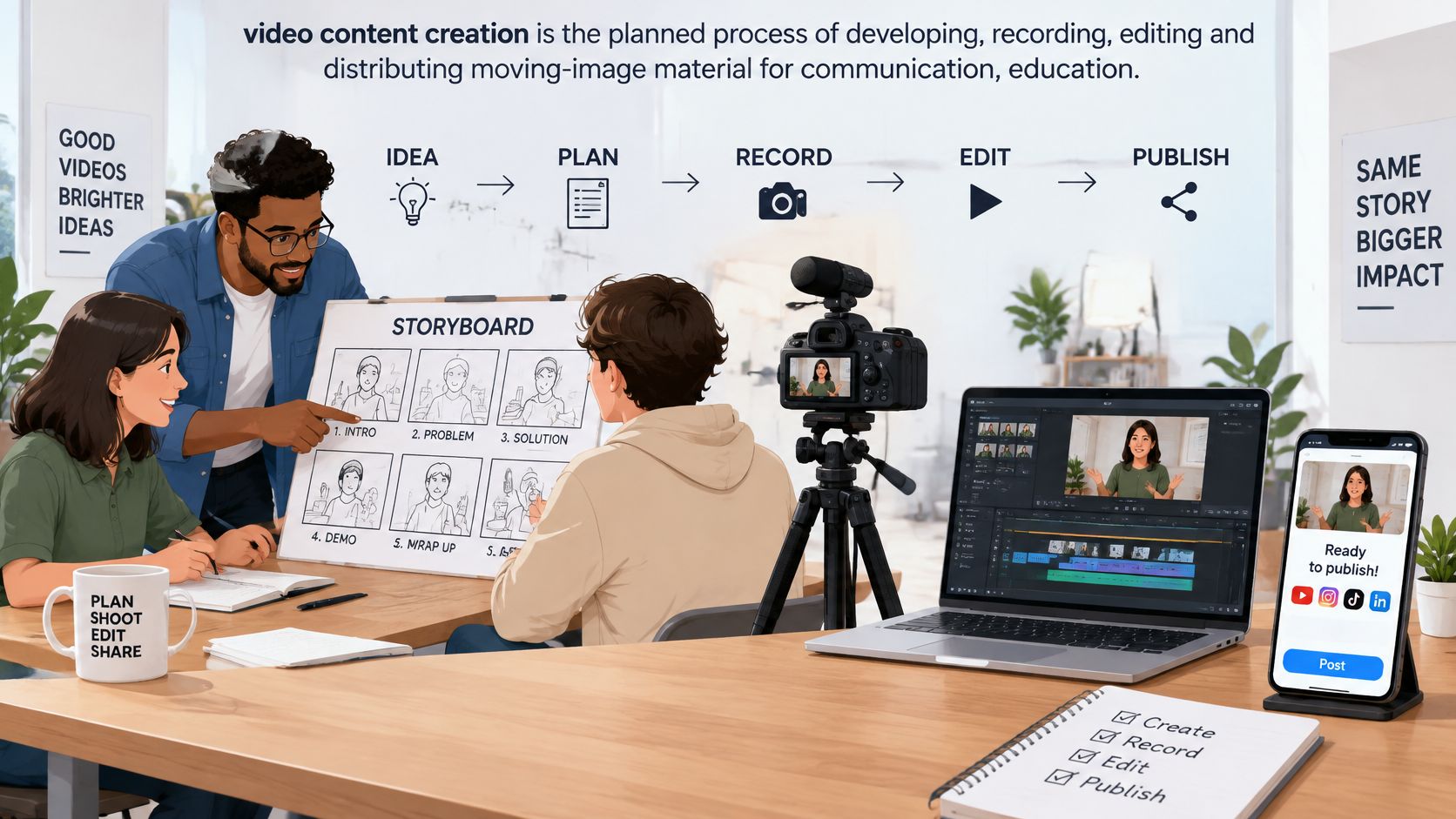
A useful production includes several connected outputs and decisions:
The message: What should the viewer understand?
The footage: Which people, actions, and details prove the point?
The finished asset: What needs editing, captions, or graphics?
The release: Where will people find it, and what should they do next?
This collaborative production setup illustrates how those tasks connect.
A phone recording can absolutely become finished content. But without an audience, an objective, and a publishing plan, it's better treated as raw material, not a completed project.
Video content creation moves a viewer from a question to a useful next action.
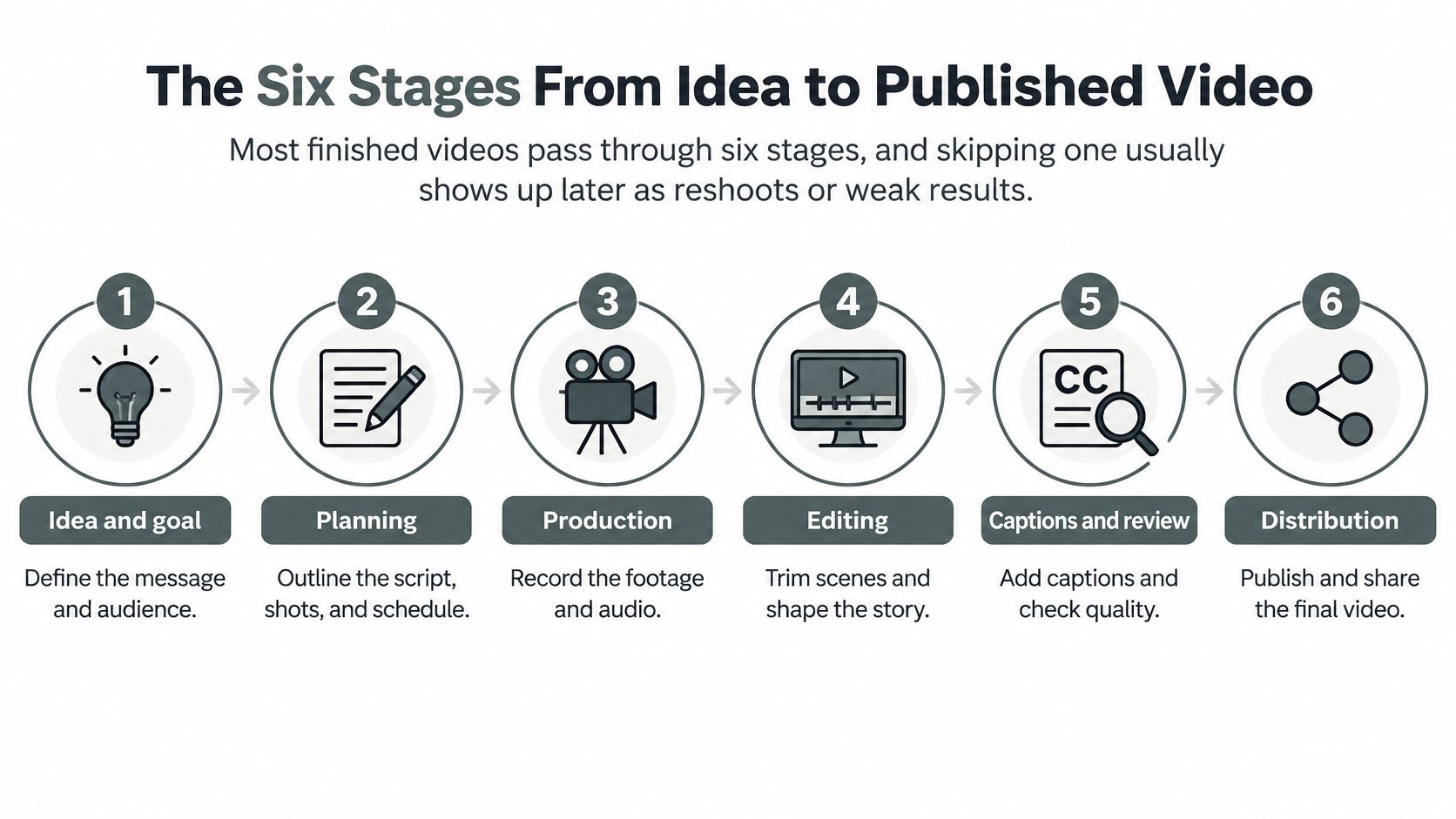
The Six Stages From Idea to Published Video
Most finished videos pass through six stages. Skipping a decision early often means paying for it later through reshoots, confusing edits, or a video that doesn't support the business.
The process map shows how the work moves from an initial idea to distribution.
Build the video before pressing record
Plan the objective. Choose an audience, a business goal, and a primary publishing channel. A demonstration for an interested buyer needs different evidence from a recruiting video for someone who has never heard of the company.
Script and storyboard. Write the opening, the essential explanation, and the next action, then list the shots needed to support them. A storyboard can be simple boxes and notes, but don't leave a key product close-up to memory.
Capture picture and sound. Use an external microphone where possible, monitor it through headphones, and record a short playback test before continuing. Keep the camera's native frame rate consistent rather than changing it repeatedly during editing.
Edit and finish. Remove repetition, arrange the explanation in a sensible order, and use supporting footage where viewers need to see what the speaker means. Then match color and sound levels, because uneven brightness or sudden volume changes distract from an otherwise clear message.
Caption and export. Add readable captions and necessary graphics, then save a high-quality master before creating channel-specific exports. A master is your clean finished source file, not a copy downloaded from a social platform.
Publish and measure. Check the title, thumbnail, description, destination link, and playback before release. Compare viewer behavior with the original objective rather than declaring success from views alone.
Make technical choices deliberately
For a practical recording setup, preserve a consistent native rate such as 24, 25, or 30 frames per second; streaming bitrates can run from approximately 400 Kbps to 5 Mbps, depending on resolution, motion, and network conditions, as described in the MDN video codec guide. Bitrate describes how much data the video uses over time, not whether the explanation is good.
For web exports, H.264 is a sensible compatibility-first choice. Don't repeatedly compress an already compressed export when you need another version; return to the master or editing project.
Use this video as a companion while mapping your own production checklist.
Protect time for scripting and edit-and-finish work. An unclear script can also create expensive reshoots, so track preparation, capture, and finishing separately during a pilot shoot rather than assuming recording time equals total production time.
Matching Formats to Your Business Goal
Choose the format by the action you want, not by the format everyone else appears to be making. These are starting runtime targets for planning, not platform limits or guarantees of performance.
Business goal | Best format | Typical length |
|---|---|---|
Trust | Customer testimonial | About 60 seconds |
Education | How-to explainer or course lesson | 8-20 minutes |
Hiring | Team and company-culture video | Long enough to show the role, workplace, and application step |
Conversion | Product demonstration | 1-3 minutes |
Community | Event recap or podcast episode | 20-60 minutes for a podcast; a concise highlights cut for a recap |
Read the trust row as a production decision: if a buyer needs reassurance, a focused customer testimonial can provide evidence without a lengthy company introduction. Ask the customer what problem they faced, what changed, and what they'd tell someone considering the same purchase.
An event recap and a podcast serve community differently. Don't stretch a recap to fill a podcast-length slot; show the people, activity, and reason to attend again.
Give the format a specific job
Talking-head videos accounted for 56.89% of creator content in OpusClip's dataset of creators active on its platform between January and August 2025, according to its creator-industry report. That's a finding about that platform's creators, not all business video, but it illustrates how familiar the format has become.
A person speaking to camera still needs a specific reason to hold attention. Before scripting, collect real questions from customer emails, sales conversations, or inquiries and turn them into working titles:
Purchase uncertainty: How do I choose the right option for my space?
Process confusion: What happens after I book?
Practical difficulty: How do I maintain this product?
For more ways to turn those questions into finished pieces, browse these content creation examples.
Decision test: If viewers need to follow a procedure, show the procedure. If they need reassurance, show credible proof.
Longer formats give you room for explanation and context, but require more preparation and editing. Short clips demand sharper choices: remove the background discussion, not the evidence that makes the answer believable.
Equipment Tiers and What a Shared Studio Provides
Improve audio first, then lighting, then the camera. A sharp picture won't rescue a voice buried under echo, ventilation noise, or clothing rubbing against a microphone.
Start with equipment you already own and upgrade when you can name the failure. The comparison below uses purchasing and booking rules rather than invented price estimates, since an equipment budget needs actual quotes.
Tier | Typical gear | Best fit |
|---|---|---|
Phone starter | Smartphone you own, clip-on microphone, window light | Short social clips and quick updates |
Creator kit | Mirrorless or action camera, lavalier microphone, LED panel, editing software | Talking heads and tutorials |
Podcast or interview studio | Camera, dynamic or condenser microphones, acoustic treatment, two-camera setup | Interviews, podcasts, and multi-camera recordings |
Shared studio rental | Confirmed recording kit, sound isolation, controlled lighting, hourly or membership access | Occasional productions without owning gear |
Choose for the problem you actually have
The phone starter keeps the initial purchase focused on sound and stability. Put the phone on a tripod, face a window, and avoid mixing daylight with strongly colored overhead lighting.
A creator kit adds control, but also adds batteries, storage, lenses, and setup decisions. Choose it when repeatable framing or lighting matters enough to justify managing the equipment.
A podcast or interview studio supports conversations with dedicated microphones and consistent positioning. Dynamic microphones can be useful close to a speaker in a less forgiving room; condenser microphones can capture more room detail, so placement and acoustics matter.
A shared studio can replace several purchases with access to a prepared environment. Compare the total booking cost, setup assistance, file delivery, and any membership requirements, not just an advertised session rate.
Check the room as carefully as the camera
Before reserving an unfamiliar studio, get concrete answers:
Microphones: Which models are available, and how many people can be recorded separately?
Sound isolation: Does the room block outside noise, or only reduce echo inside?
Lighting: Can you control brightness, color, and window light?
Editing: Is software access included, and who handles the files?
Camera coverage: Can the setup provide another angle without disrupting sightlines?
Use this podcast equipment rental guide to help organize the booking conversation.
A shared workspace can also put you near professionals who can give useful feedback. A scoping review of coworking spaces associated collaboration and networking with social interaction, mutual support, and physical proximity, although proximity isn't a promise of collaboration.
Choose equipment for your highest-stakes planned video, not automatically for your most frequent update.
Captions and Human Review as Production Quality
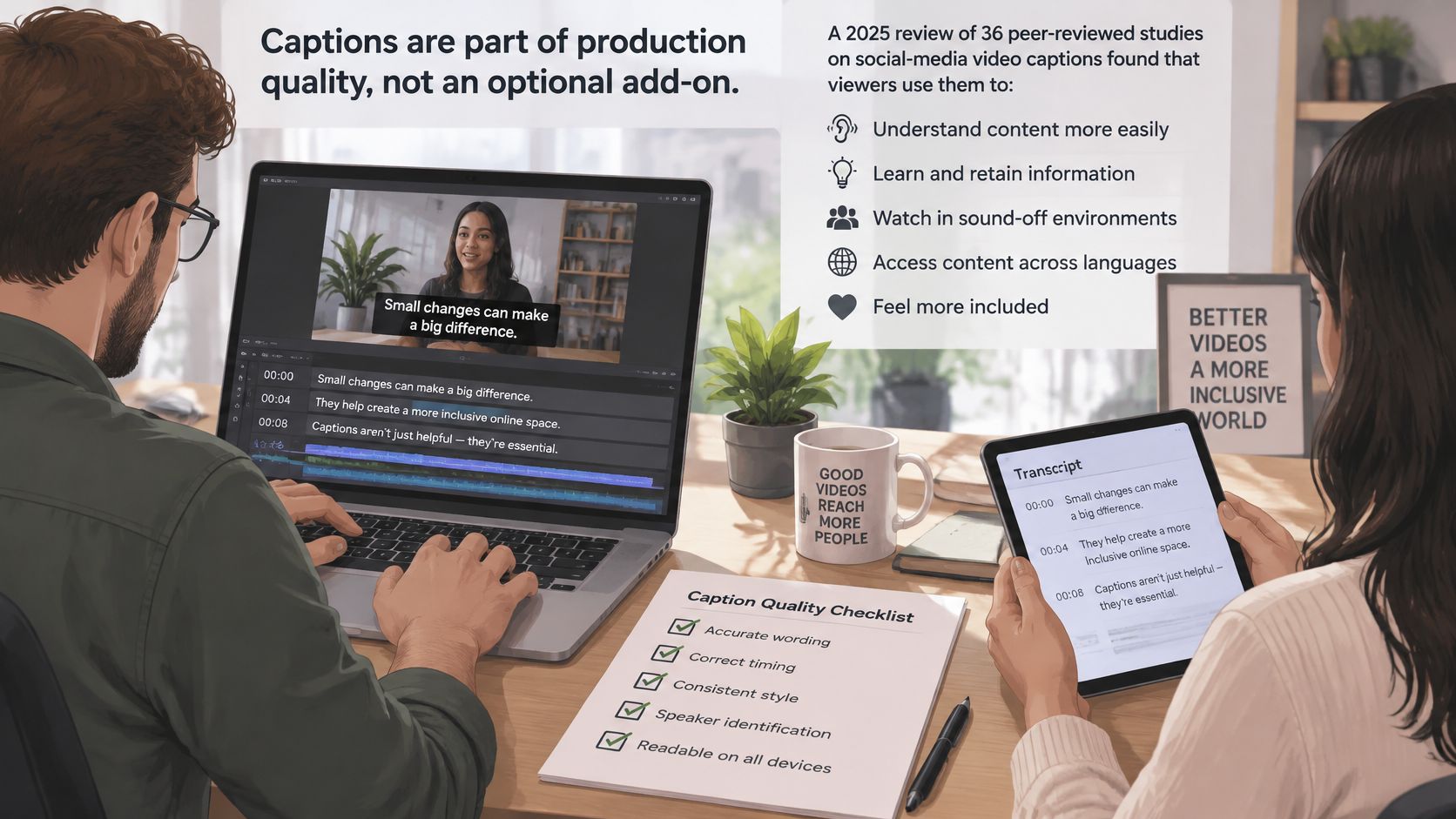
Captions are part of the finished product, not decoration added when time remains. A 2025 review of 36 peer-reviewed studies found that viewers use social-media video captions to understand speech, maintain attention, and recover after distraction, according to the Monash University caption review.
A transcript and captions aren't interchangeable. A transcript is readable text; captions synchronize text with the video so viewers can follow what happens as it happens.
Caption review deserves the same attention as picture and sound review.
Check more than spelling
Names and jargon: Correct people, places, product names, and specialized terms.
Timing: Align captions with speech rather than letting text arrive after the point.
Readability: Break lines at natural phrases and preview them on a phone.
Speaker changes: Make it clear who is talking when the picture doesn't.
Delivery: Export an SRT or WebVTT sidecar file when the publishing platform supports it.
For example, a workshop recording can produce an edited transcript, synchronized captions, and a short captioned highlight. Each output needs its own review: a sentence that makes sense in the full discussion may sound misleading when isolated.
Let AI assist, not approve
AI tools can draft scripts, suggest cuts, generate captions, and prepare translations. In Wistia's 2025 State of Video report announcement, reported AI use for video creation rose from 18% in 2024 to 41% in 2025.
Efficiency doesn't remove responsibility. Use these safeguards before publishing:
Consent: Obtain written permission from people being recorded.
Disclosure: Clearly identify synthetic media when viewers could mistake it for a real recording.
Fact-checking: Verify claims, quotations, demonstrations, and translated meaning.
Copyright: Confirm permission or appropriate licensing for music, images, and stock footage.
Identity protection: Don't clone someone's voice or likeness without permission.
Watch the final export, not just the editing timeline. Automated cuts can remove a qualifying phrase, and generated captions can reverse meaning by missing a small word.
AI can speed the draft. A named person must approve the final cut.
In-House, Outsourced or Shared
Who should do the work once the plan is ready? Compare the stakes, complexity, and repetition of the video before deciding whether production belongs inside the business or with a specialist.
Production model | Strongest fit | Main responsibility to retain |
|---|---|---|
In-house | Recurring updates, practical advice, familiar customer questions | Maintain consistency and protect staff time |
Outsourced | Brand films, difficult locations, complex interviews | Supply accurate information and clear approvals |
Hybrid or shared | Internal expertise with specialist capture or editing | Coordinate files, feedback, and ownership |
An internal team knows the customers' language and can respond quickly when a useful question appears. The trade-off is capacity: video work competes with sales, service, and daily operations.
An outside producer brings technical judgment and dedicated production time. They still need access to your subject expertise, permission to film, and an approver who can make decisions without contradictory feedback from several departments.
Assign roles, not just tasks
Before the shoot, name the people responsible for each handoff:
Owner: Sets the objective and defines success.
Writer or producer: Prepares the script, shot list, and schedule.
Camera and audio operator: Checks capture quality and backs up recordings.
Editor: Builds and finishes the cut.
Reviewer: Checks accuracy, consent, and brand voice.
Someone can hold several roles, but separate editing from approval where possible. A reviewer who hasn't spent hours with the footage is more likely to notice an unexplained term or missing step.
Practical rule: Keep business judgment close to the business; bring in production skill where mistakes would be expensive.
A hybrid arrangement might pair an internal subject expert with a shared recording room and a freelance editor. Agree on file naming, delivery format, revision responsibilities, and final approval before recording, so a polished shoot doesn't end with unusable handoffs.
Where Videos Get Published and in Which Shape
A high-quality master can support several releases, but each version needs deliberate framing. Resizing changes the canvas; it doesn't automatically preserve faces, demonstrations, graphics, or readable captions.
Use these as editorial starting points, not current platform upload limits.
Channel | Aspect ratio | Typical length | Viewer expects |
|---|---|---|---|
YouTube long-form | 16:9 | 8-20 minutes | Full explanation and chapters |
Shorts, Reels and TikTok | 9:16 | A concise, self-contained answer | One idea with on-screen captions |
LinkedIn feed | 1:1 | Enough time to explain one professional insight | Professional insight with captions |
Website and email | Match the page layout, commonly 16:9 | 1-3 minutes | Proof or a product demonstration |
Podcast feeds | Audio only | 20-60 minutes | A full conversation and show notes |
Re-edit instead of blindly cropping
For example, a 40-minute studio podcast could become a full widescreen episode, three vertical clips, a square professional-insight clip, and an audio-only release. Those are planned deliverables for that hypothetical session, not a requirement for every recording.
The vertical versions need their own openings and endings. If a guest says “that's why we changed it,” include enough context to explain what changed rather than publishing a clip that relies on an earlier conversation.
Check demonstrations especially carefully. A crop centered on the speaker can hide the product they're explaining, so use a close-up or a separate reframed shot instead.
Give every release a measurable job
Publish the captioned version and make the topic clear immediately. Use a specific title, a thumbnail that reflects the actual content, and a next step that matches the viewer's readiness.
Long-form video: Track completion or watch time alongside the intended business outcome.
Short clips: Track relevant clicks or qualified inquiries rather than reach alone.
Website video: Check whether viewers take the associated product or booking action.
Podcast episodes: Watch listening behavior and responses to the episode's invitation.
Short clips offer a low-commitment introduction. Longer videos give interested viewers room to evaluate an explanation, so don't judge both by the same success measure.
Book Your First Shoot Before You Buy Gear
A pilot shoot can show whether your real bottleneck is presenting, capturing clear sound, demonstrating a product, or finding time to edit. Test the process before investing in equipment, and let one customer question guide the work from idea to publication.
Start with a clear outcome: who should the video help, and what should that viewer do afterward? Gather real customer questions, turn them into possible titles, and choose the one with the clearest business value. Then outline the explanation, demonstration shots, and supporting details the viewer needs. This is your production map; without it, a polished recording can still miss the question.
Choose the simplest setup that can reliably deliver the sound and lighting the video requires. Reserve a suitable space, rehearse the opening, and record clean source material. After filming, review the captions, export the version suited to your chosen channel, and publish with a measurable next action.
Use the session to learn what you need
A focused interview or a short workshop can make a manageable pilot. Keep notes on setup problems, missing shots, and editing difficulties. Those notes show what to improve next time and whether you need different equipment, a clearer outline, or more time for editing.
Freeform House is a members-only club and workspace in a restored 1920 building in downtown Jenks. It offers a central place for collaboration and networking, along with creative resources for professional content production. Its podcast booth includes professional-grade microphones, soundproofing, and editing software. Confirm the camera and lighting arrangements your shoot requires, and consult this video shoot location guide to plan practical details.
Define a finish line
A successful pilot answers the chosen question, includes reviewed captions, and reaches its intended channel with a measurable goal. Then assess the business result: did the video help viewers take the action you wanted? Use that answer to repeat, revise, or replace the idea.
Set a review date after publication and compare the results with your goal. Decide what to change based on the problems recorded during production, rather than buying gear before you know what the process needs.
Freeform House gives members access to shared workspace and creative resources, including a podcast booth for recording. Visit Freeform House to explore the community and ask about arranging a first podcast or interview session before investing in your own production setup.
Comments