Small Business Infrastructure That Actually Scales

A founder starts the day at home, moves to a coffee shop for reliable Wi-Fi, takes a client call from the car, and finishes invoices after dinner because the workspace, software, and admin systems never quite line up. The business may be growing, but its infrastructure is still held together by personal workarounds, borrowed meeting rooms, and passwords known by one person.
That arrangement can survive early experimentation. It struggles when clients expect consistency, employees need clear access, and every interruption pulls the owner back into operations. Small business infrastructure is the operating system behind growth, combining place, technology, workflows, people, money, and community into a system that can carry more demand without creating more chaos.
Why Small Business Infrastructure Decides Growth Early
A founder can win new work and still lose hours every week to unreliable infrastructure. A home connection slows during a large upload, a coffee shop offers no privacy for a sensitive call, and separate software tools leave the owner copying information between systems. The business appears busy, yet its operating environment cannot support the demand.
That creates a practical ceiling. Sales improve while delivery becomes harder. The owner schedules more meetings but spends longer finding a suitable room. A new team member arrives and no one can clearly explain which files they can access, how approvals move, or who owns the next action. Growth exposes weaknesses that improvisation kept hidden.

Fragmentation creates an invisible operating cost
Disconnected infrastructure rarely arrives as one alarming invoice. Its cost appears in daily delays:
Lost focus: The owner troubleshoots access, books rooms, follows deliveries, and reconciles records instead of completing revenue-producing work.
Missed confidence: Clients who wait for a private meeting space or receive inconsistent updates may question whether the business can handle their work.
Slower decisions: Staff cannot act quickly when information is spread across personal drives, inboxes, spreadsheets, and chat threads.
Owner dependency: A workaround understood only by the founder becomes a bottleneck when the business adds people or demand.
Infrastructure should be planned as one operating system of place, technology, workflows, people, money, and community. The location affects privacy and customer experience. Connectivity and software determine how information moves. Trusted local relationships can supply meeting space, deliveries, introductions, or practical support. A premium local hub can bring several of these functions together, replacing fragmented leases, tools, and networks with one anchor asset. That choice may cost more than a single desk or app, but it can reduce coordination work and give the business a dependable base.
Broadband access shows why the definition must extend beyond IT. The Small Business Administration Advocacy broadband report reports that terrestrial broadband access among U.S. small business establishments rose from 48.1% in 2014 to 83.9% in 2024, while 74.8% had access to 250 Mbps download and 25 Mbps upload service in 2024. Connectivity now affects remote work, cloud applications, customer service, online sales, and the credibility of a business that must respond quickly.
Practical rule: If one failure can stop sales, delivery, client access, or payroll, include it in the infrastructure plan rather than leaving it for later.
A reliable setup gives employees dependable places to work, clients a professional way to meet, and the owner fewer emergencies to absorb personally. The strongest arrangements connect digital systems with the physical place and local community around them. Better software may solve one bottleneck. A well-chosen operating base can remove several at once.
The Six Pillars of Small Business Infrastructure Explained
A business can have good software and still lose hours to a poor workspace, unclear approvals, or one person holding all the operational knowledge. The six pillars below provide a shared map for evaluating the place, technology, money, work, people, and obligations that keep the company running.
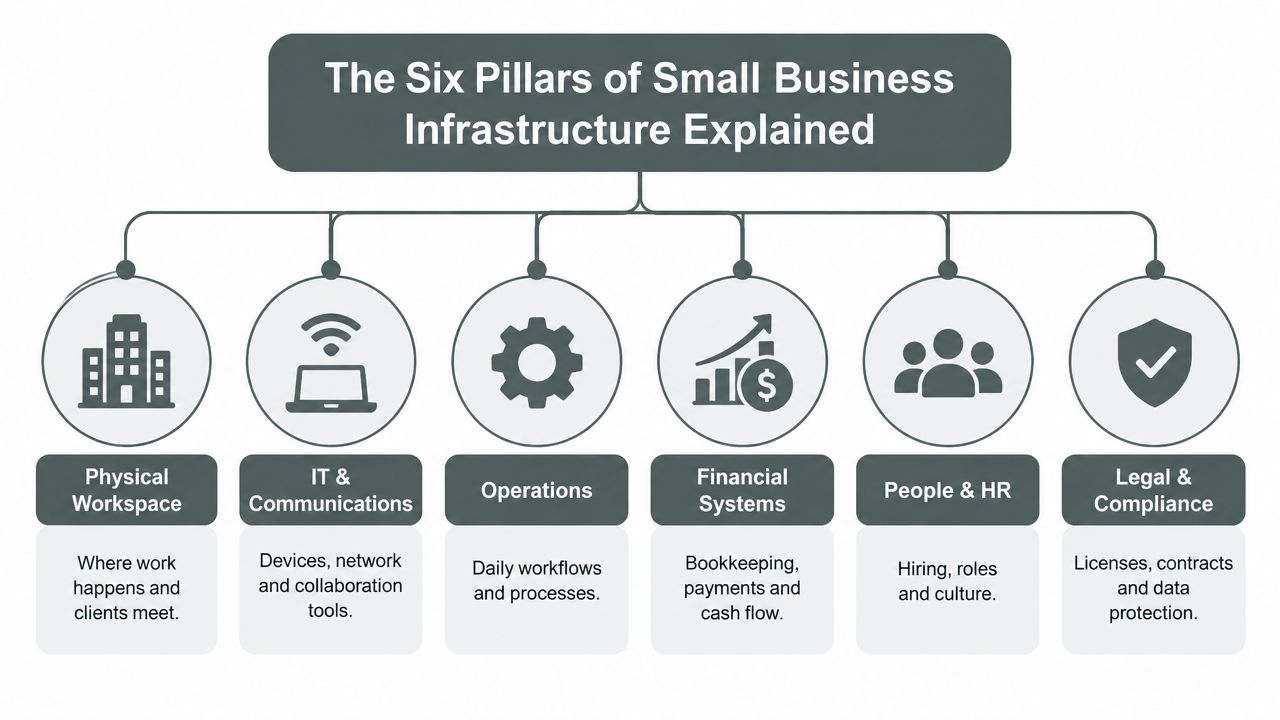
Physical workspace
The workspace shapes how employees work and how customers, candidates, and partners experience the company. It may include a home office, leased premises, flexible workspace, storage, meeting rooms, parking, accessibility, and the practical conditions for arriving and staying productive.
Choose space around the situations the business must handle reliably. A consultant may need a quiet executive room. A creative team may need production space. A remote company may need an occasional base for planning, client meetings, and relationship building. A premium local hub can combine several of these functions, replacing separate leases, tools, and networks with one dependable anchor.
IT and communications
This pillar includes devices, internet access, Wi-Fi, cloud storage, email, messaging, video meetings, phone systems, security controls, and technical support. Staff should reach the information they need from the locations where they work, while the owner remains the operator rather than the permanent help desk.
Broadband choice has expanded, but more options also create decisions about vendor quality, backup access, security, and support. Connectivity belongs in the same operating plan as the physical site because a workspace that cannot support calls, cloud applications, or customer service is not dependable infrastructure.
Operations and workflows
Operations defines how work moves from a request to completion. Intake, approvals, handoffs, service delivery, quality checks, and customer follow-up should be clear enough that staff do not invent a new process for every job.
Automate only after the workflow is understandable. A faster confusing process still creates errors, delays, and rework.
Financial systems
Bookkeeping, invoicing, payments, payroll, purchasing, cash-flow visibility, and approval authority form the financial layer. Tools help only when people know which figures are current, who can approve spending, and when money must move.
People and culture
Roles, hiring, onboarding, training, communication norms, and accountability determine whether the planned systems work in daily practice. Employees need clear expectations, usable procedures, and enough training to make consistent decisions. A technically sound setup fails when shortcuts are rewarded or essential knowledge stays with one person.
Legal and compliance
Licenses, contracts, insurance, privacy obligations, records retention, and data protection belong on the same infrastructure map. These requirements affect the other pillars directly. A contract may limit access, a privacy rule may change how data is stored, and a lease may impose operating conditions.
The pillars operate as one system. A client meeting can involve space, connectivity, scheduling, hospitality, staff responsibilities, and contractual rules. A new hire may require equipment, permissions, payroll, training, workspace access, and documented procedures. Owners get better results by checking that full chain before approving isolated purchases.
How to Audit Your Current Setup and Set Priorities
A business can lose a morning to a failed connection, an unclear approval, or a spreadsheet only one person understands. Audit the operating system behind the company, including its place, technology, people, and local relationships, before buying another tool.
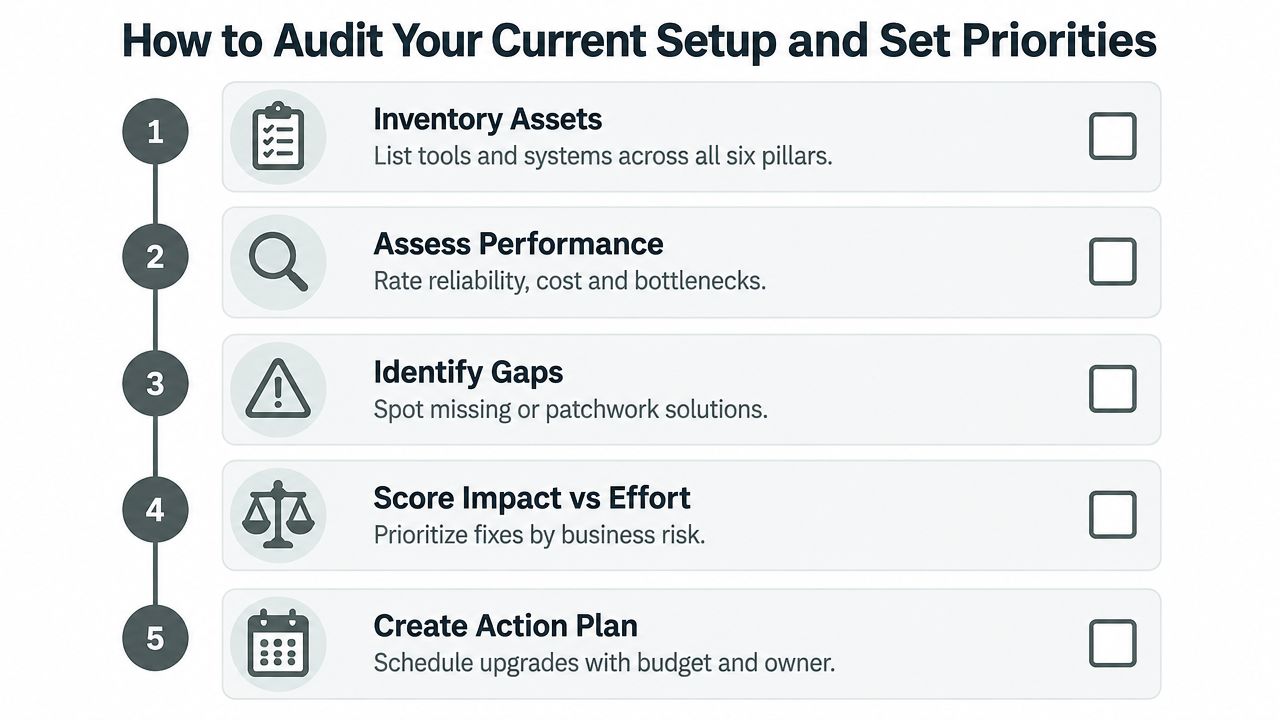
Step one, inventory the real environment
List every important asset across the six pillars. Include laptops, phones, routers, subscriptions, shared drives, accounting systems, meeting locations, vendors, contracts, recurring workflows, and people who hold critical knowledge. Add the community dependencies that support daily work, such as local suppliers, delivery routes, nearby meeting options, and referral relationships.
Include assets the company does not own. A founder's personal laptop, a staff member's spreadsheet, or a coffee shop used for client meetings may carry business-critical work. Note who controls each asset, who can access it, and what stops working if it disappears.
Step two, observe performance
For each item, record whether it is reliable, expensive, difficult to use, dependent on one person, or exposed to a clear failure. Ask staff where work slows down. Follow an order, client request, invoice, or new-hire process from beginning to end, and record every handoff, delay, and repeated entry.
Map location-dependent bottlenecks separately. The U.S. Chamber of Commerce Small Business Index findings show that 64% of owners considered high-speed internet very important to success, but only 21% rated its quality very good. The same survey found that 57% considered local roads and bridges very important, while only 10% rated them very good. Connectivity, deliveries, parking, commutes, and customer access belong on one risk map.
Step three, identify gaps
Look for missing controls and patchwork solutions. Typical examples include an unowned shared inbox, staff using personal storage, software that does not exchange data, undocumented approvals, and backup processes nobody has tested. Also flag work that depends on one location, one vendor, or one employee's memory.
The SMB IT trends report identifies project management at 44% and data security at 39% among major IT gaps. The practical warning is clear: governance may be the weakness, rather than the absence of another application.
Step four, score impact against effort
Use a simple matrix:
Priority | Business impact | Effort | Typical action |
|---|---|---|---|
Immediate | High | Low or moderate | Fix access, backups, connectivity, or ownership |
Planned | High | High | Replace a core system or redesign a workflow |
Opportunistic | Moderate | Low | Improve convenience after critical risks are covered |
Deferred | Low | High | Avoid until demand justifies it |
Budget first for failures that could stop revenue, expose sensitive information, or make delivery impossible. Fund changes that remove recurring manual work next. Leave aesthetic upgrades and speculative tools until the foundation holds.
Step five, assign owners and dates
Every action needs one accountable owner, a target date, a budget range, and a success condition. If the business cannot maintain a system internally, compare a managed provider, specialist contractor, shared local resource, or a premium local hub with building the capability in-house. The right choice may replace several fragmented leases, tools, and informal networks with one dependable operating base.
For administrative bottlenecks, document the workflow before outsourcing it. A practical reference for evaluating administrative support services helps when the owner spends too much time on scheduling, correspondence, records, or routine coordination.
Review the action list monthly. Close completed items, test the fixes, and remove obsolete tasks so the audit becomes a working management tool rather than another neglected document.
Building Reliable Workspace IT and Operations Without Patchwork
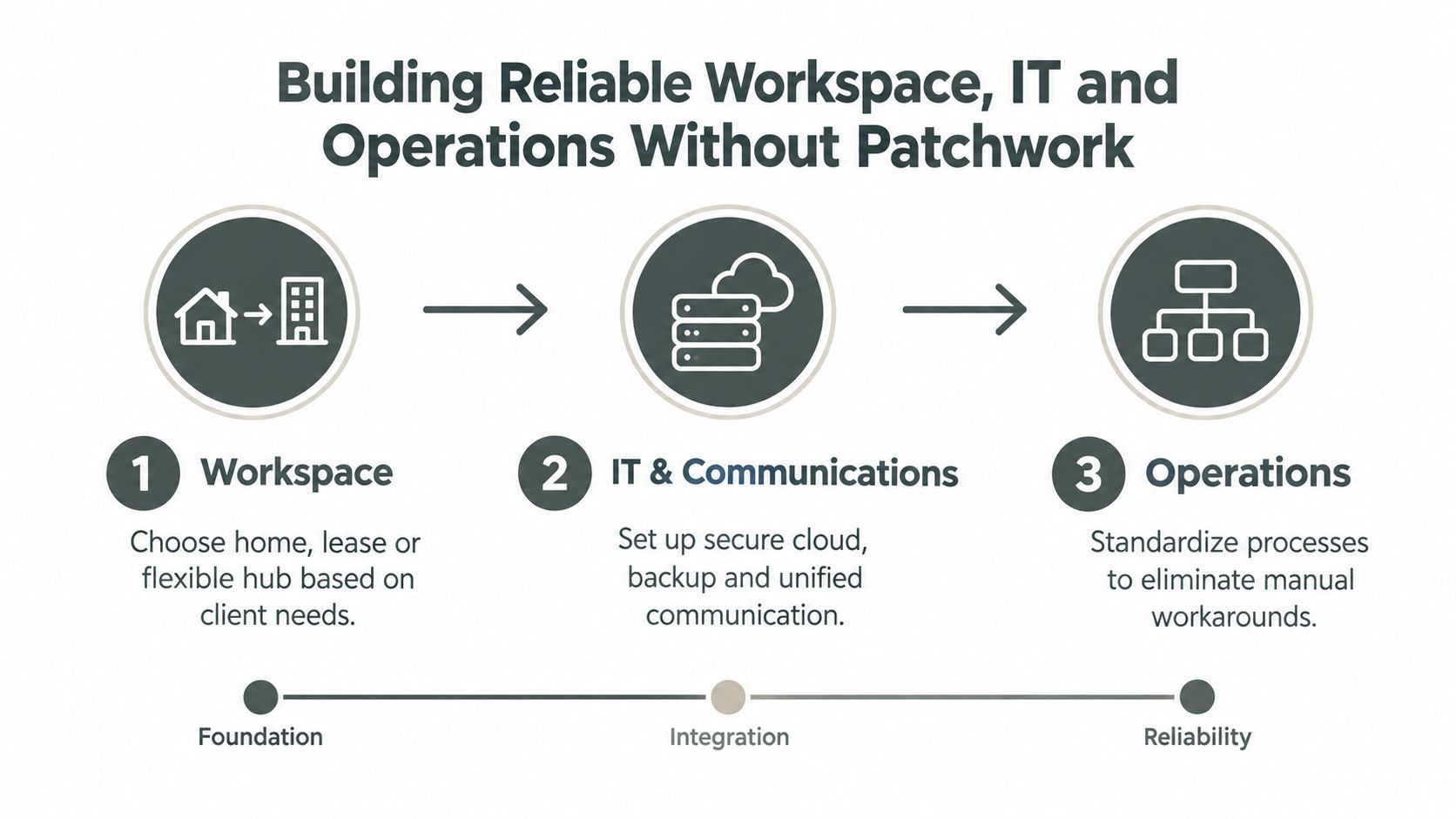
A business can have good tools and still run badly. A home office keeps overhead low, but it may not support confidential meetings, team collaboration, or a clean boundary between work and personal life. A conventional lease offers a stable address and control over the space, yet fixed costs remain when rooms sit empty. A flexible hub can provide professional access without forcing the company to carry every facility responsibility itself.
Match the workspace to the work:
Client-facing work: Prioritize arrival experience, privacy, presentation quality, and dependable meeting technology.
Hybrid teams: Prioritize quiet work areas, bookable rooms, strong connectivity, and clear access rules.
Creative production: Prioritize lighting, acoustics, storage, content equipment, and flexible layouts.
Events and workshops: Prioritize circulation, food service, setup support, and reliable guest handling.
Build an IT baseline
Start with an asset register. Record each device, its owner, operating system, warranty status, business purpose, and replacement path. Classify systems as critical, important, or replaceable. A failed printer should not receive the same response as unavailable financial records.
The SME infrastructure guidance from SST Cloud identifies recurring problems such as outdated software, weak patching, limited automation, poor integration, and under-trained staff. Apply its practical direction: map data, test changes in a sandbox, and keep a rollback plan before migrating or automating anything.
Integration beats accumulation. A smaller set of connected systems is easier to govern than an impressive collection of tools that cannot share reliable data.
Keep the baseline practical:
Connectivity: Provide a primary business connection and test a fallback if downtime would interrupt delivery.
Access: Use individual accounts, role-based permissions, and multi-factor authentication for critical services.
Data: Define where working files live, who owns them, how they are backed up, and how they are recovered.
Updates: Set a patching cadence, test important changes, and document how to reverse a failed update.
Support: Record vendors, renewal dates, escalation contacts, and emergency access procedures.
Document operations before adding automation
Write each current workflow in plain language. Record the trigger, owner, inputs, decisions, handoffs, output, and exception path. Remove unnecessary steps before asking software or AI to accelerate the process.
Integration failures usually start with unclear ownership or inconsistent information. A new CRM will not repair incomplete customer records. An AI assistant cannot produce dependable recommendations from missing data. A workflow tool will not fix an approval process that nobody owns.
The three-step process for building reliable business infrastructure connects workspace, IT, and operations rather than treating them as separate purchases.
Infrastructure is working when a trained employee can complete important work without asking the founder to interpret every step. That standard matters more than having the newest application. The best setup is an operating system for the business, joining place, technology, and the local relationships that help work get done.
Using a Premium Local Hub as Your Infrastructure Anchor
A premium local hub can consolidate needs that otherwise require several leases, vendors, subscriptions, and informal arrangements. The value isn't just a desk. It's the combination of a credible place to meet, dependable work infrastructure, production resources, hospitality, logistics, and access to people who can create new business relationships.
Freeform House is envisioned as a membership-based club in the heart of Jenks, Oklahoma's 10 District downtown, with a restored 1920 building, three stories, and 10,000 square feet of workspace and gathering areas. Its model combines coworking with a community hub designed for collaboration and connection, closer to a private professional club than a basic drop-in office. Any operator evaluating a similar hub should judge it by reliability, flexibility, and network value, not square footage alone.
A few practical scenarios show the difference:
Business need | Infrastructure combined |
|---|---|
Executive meeting | Private room, professional setting, connectivity, guest handling, refreshments |
Coworking day | Focused workspace, network access, administrative support, community |
Podcast or content production | The Rise loft studio, in-house podcast booth, production-ready setting |
Workshop | Flexible room, participant experience, food and beverage coordination |
Private event | Space, local partnerships, logistics, guest arrival, community visibility |
Freeform House provides access to four distinct rooms, the Hall of Fame Room, Freeform Room, Executive Room, and Thomas Room, along with The Rise loft studio and an in-house podcast booth. Partnerships with local restaurants and coffee shops provide meals and beverages on demand at no extra delivery cost, while Amazon Hub Lockers and a rentable golf cart fleet address practical daily logistics.
That combination can replace several fragmented workarounds. A team may use the same membership for a planning day, a client presentation, a recording session, and a local event instead of maintaining underused facilities for each purpose. The appropriate comparison is not membership against desk rent. It is membership against the total friction of separate rooms, travel, hospitality, equipment, delivery coordination, and relationship building.
The small business hub model is most useful when it becomes an operating anchor, not an occasional backdrop. Members should still verify booking reliability, privacy, internet performance, storage rules, guest policies, and the practical support available during important meetings.
Keeping Your Infrastructure Lean Secure and Ready for Growth
Infrastructure starts to decay when maintenance has no clear owner. A careful technology purchase, documented workflow, or well-chosen workspace can lose value through expired accounts, excessive permissions, duplicate files, untested backups, and software added without a plan for its data.
Set a light operating cadence and review the setup monthly:
Access: Remove former users, check privileged accounts, and confirm that contractors still need their permissions.
Data: Delete duplicates, verify ownership, review sharing settings, and keep important records in approved systems.
Resilience: Check backup status, recover a representative file, and confirm that fallback connectivity or workspace arrangements still work.
Vendors: Review renewals, service quality, export options, and dependencies that could create lock-in.
Workflows: Check whether staff follow the documented process or rely on unofficial workarounds.
Community: Maintain local relationships, service partnerships, and member connections that support work beyond the software stack.
Security belongs in the initial infrastructure decision. A 2025 small-business security analysis reports that 71% of SMBs had not deployed endpoint security and 78% had no dark web monitoring, according to Stellar Cyber's SMB security analysis. The practical choice is to build security capability internally, buy a managed stack, or assign monitoring and response to a qualified provider.
Outsourcing gives a small firm access to expertise it may not be able to maintain alone. It also creates trade-offs involving vendor lock-in, visibility, response authority, documentation, and exit planning. Before signing, require clear ownership of accounts and data, defined escalation procedures, transparent reporting, and a usable export path.
Govern data before expanding AI
The 2025 SMB IT trends report notes that nearly half of SMBs struggle to prepare data for AI workloads and that more than 40% still face persistent compute, storage, and networking performance issues. More tools will not fix inconsistent records, unclear permissions, or undocumented processes. AI can spread those errors faster.
Start with data ownership, naming conventions, access rules, retention, and one reliable source of truth. Test one narrow use case with human review. Expand only when the business can explain where the data came from, who can use it, and how to correct an output.
Freeform House's security features can form part of a broader workspace review, alongside network controls, access management, privacy practices, and the security duties that remain with the member business. A polished location does not replace governance. It can provide one dependable component of an operating system that combines place, technology, and community.
Review infrastructure whenever customers, team structure, location, data use, or service delivery changes. The right system is the one your team can understand, maintain, secure, and adapt without sending every decision back to the founder.
Freeform House offers members a premium Jenks workspace and community hub with distinct meeting rooms, coworking areas, The Rise loft studio, an in-house podcast booth, local food and coffee partnerships, Amazon Hub Lockers, and rentable golf carts. Visit Freeform House to assess an infrastructure anchor for executive meetings, focused work, content production, workshops, and local connection without placing every need in a separate lease or tool.
Comments