Professional Video Production: A Local Business Guide

A Jenks business owner can spend a morning answering customer messages, managing staff, and planning the next promotion, then notice a competitor's polished video appearing across Instagram, Google, and the company website. The competitor seems to be everywhere, while the business's own marketing still depends on static graphics and long blocks of text. The problem usually isn't a lack of stories. It's the absence of a repeatable production system.
Professional video production gives local businesses that system. It turns an idea into a finished piece through planning, thoughtful filming, disciplined audio, editing, and delivery for the platforms where customers watch. Video has grown from a specialist creative service into a major global business format. One recent market summary estimated the global video production market at USD 70.40 billion in 2022, with a projection of USD 746.88 billion by 2030 and a projected 33.5% compound annual growth rate from 2023 to 2030 (market summary).
This guide explains what professional production involves, how the workflow operates, who does the work, what equipment and budget choices mean, and how to keep footage realistic instead of artificial. It also applies those lessons to a practical local setting, Freeform House in downtown Jenks, where a studio, podcast booth, and meeting rooms can support repeatable business content.
Why Video Now Matters for Local Businesses
A local firm doesn't need a cinematic commercial to benefit from video. It may need a short introduction from the owner, a walkthrough of its service, an interview with a specialist, or a useful answer to a question customers ask every week. Those pieces can help a prospective customer understand the people, process, and personality behind the business before making contact.
The shift matters because video now serves several jobs at once. A single conversation can become a website feature, a social media clip, a customer education piece, and material for a sales follow-up. The production challenge isn't just pressing record. It's creating footage that remains useful after the original post disappears from a feed.
From occasional project to repeatable business activity
Many owners approach video as a one-time campaign. They hire someone, film a few scenes, receive one finished file, and start over months later. That approach makes every project feel expensive and unfamiliar because the team has to rebuild the process from scratch.
A better approach treats production like a content supply line. Before filming, the business decides what audience it wants to reach, what action it wants viewers to take, and which versions it needs. During the shoot, the team captures enough planned material to support those uses. Afterward, the editor organizes the footage into a small library of connected deliverables.
The scale of the wider industry reflects this change. Video now supports advertising, corporate communication, streaming, and social media, rather than living only inside film studios or television networks. Its history also shows how access improved. Sony introduced the Portapak in 1968, JVC brought VHS decks to market in 1976, and the Video Toaster Flyer arrived in 1990 as an early non-linear editing system. Each milestone helped move production away from expensive, tape-bound workflows toward faster digital work.
What a local owner should be able to decide
By the end of a well-planned project, you should be able to answer practical questions:
Purpose: Is the video designed to generate inquiries, explain a service, introduce a team member, or support an event?
Format: Do you need a website video, vertical social clips, an interview, a podcast episode, or several versions?
Production model: Should your team handle part of the work, hire freelancers, or bring in an external production partner?
Quality control: What should you check for in framing, focus, lighting, sound, and compression?
Location: Can one reliable venue reduce the setup burden for recurring shoots?
That last question is especially useful for businesses that want consistent content without building a studio. A suitable venue can provide a controlled environment, dependable rooms, production equipment, and a professional setting without requiring the business to own every tool.
What Professional Video Production Actually Means
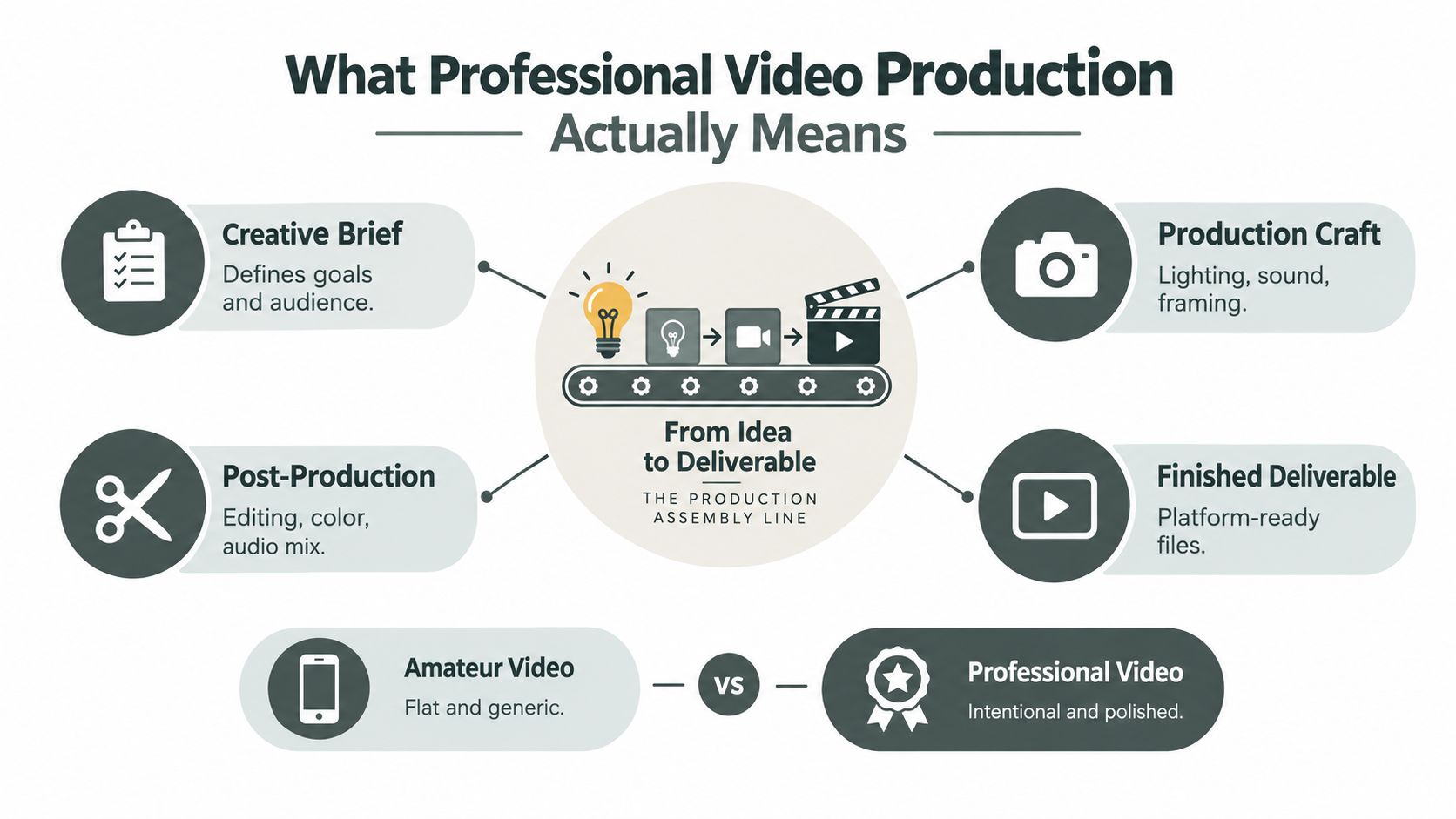
Think of production as an assembly line. The raw material is an idea, such as “help homeowners understand our remodeling process.” The finished product is a platform-ready video with a clear message, clean sound, intentional visuals, and a version that fits its destination.
A phone can capture an image quickly, but speed alone doesn't create professional work. Professional production plans the message before the camera turns on, controls the room's sound, shapes the light, chooses the frame, and removes distractions during editing. The difference is similar to the difference between ingredients placed on a counter and a prepared meal. Both contain the same basic materials, but the process determines whether the result is usable.
Core idea: Professional video isn't defined by expensive gear alone. It's defined by deliberate decisions made before, during, and after the shoot.
The three connected phases
Pre-production is the planning stage. The team clarifies the audience, message, script, locations, participants, schedule, shot list, and deliverables. During this stage a producer discovers that the owner wants a website video, six vertical clips, and an audio-only interview, rather than one general film.
Production is the shoot itself. The camera operator captures the planned scenes, the audio engineer monitors voices and room noise, and the director helps people perform naturally. Good production creates options. It records the main explanation, useful cutaway footage, alternate takes, and small moments that help the editor build a coherent story.
Post-production turns material into communication. An editor selects the strongest takes, shapes the pacing, balances voices and music, adjusts color, adds captions or graphics when needed, and exports files for each destination. Revision is part of this stage, not a sign that the original plan failed.
Why amateur footage often feels weak
Amateur video usually breaks trust through small distractions. The speaker's voice sounds distant. A bright window turns the face dark. The camera stays fixed while the subject delivers memorized lines. The edit includes pauses, repeated words, or awkward transitions because nobody planned what the viewer needed to understand.
Professional work addresses those problems before they accumulate. It doesn't have to look flashy. A calm interview in a well-lit room can feel more credible than a complicated sequence of effects. The goal is to make the viewer focus on the person and the message, not on the production mistakes.
The End-to-End Production Workflow Explained
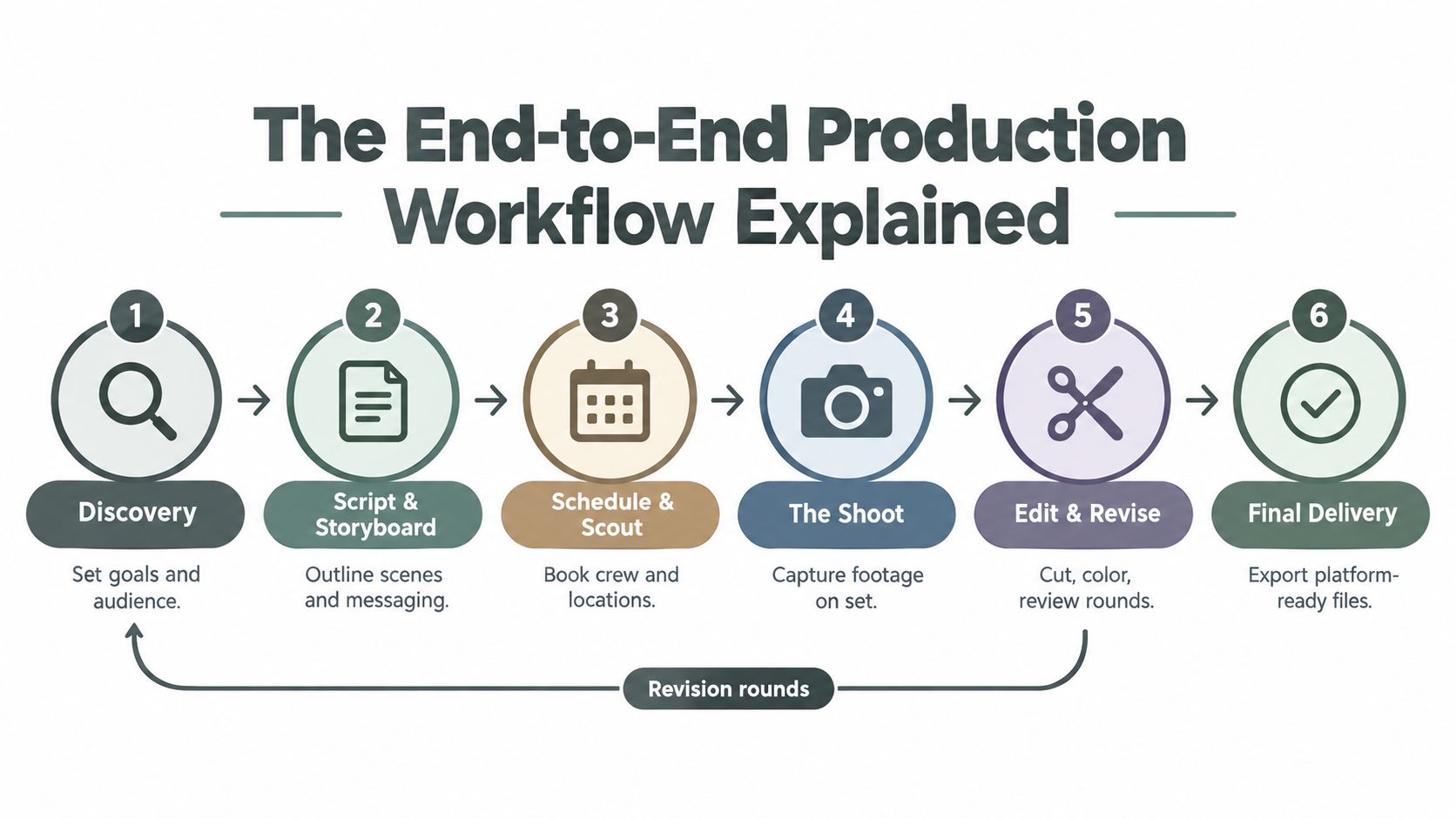
A reliable workflow begins with a conversation, not a camera. The producer asks who needs the video, what the viewer should understand, where the video will appear, and what action should follow. A local healthcare practice, for example, might decide that its main asset should introduce a new provider, while supporting clips answer common patient questions.
Six handoffs that protect the project
Discovery: The team defines the audience, purpose, tone, and required deliverables. A website hero video may need a different pace and frame shape from a vertical social clip.
Script and storyboard: The script establishes the words, while the storyboard or shot plan shows how those words will be supported visually. The practice might pair a provider introduction with footage of a consultation room, staff preparation, and a welcoming reception area.
Schedule and scout: The producer books participants, confirms room availability, checks background noise, studies available light, and identifies where equipment can be placed. Scouting prevents the crew from discovering on shoot day that the best-looking room echoes badly or faces a distracting window.
The shoot: The team records the interview, supporting scenes, alternate takes, and natural interactions. A producer keeps the day moving, while the camera and audio teams protect image and sound quality.
Edit and revise: The editor builds a first cut, the client reviews it, and the team resolves factual, tonal, or pacing issues. A clear review process prevents scattered feedback from turning into endless changes.
Final delivery: The production team exports the approved master and the platform-specific versions. The business may receive a website file, vertical cutdowns, captioned clips, and audio extracts from the same production day.
Pre-production decisions prevent post-production problems
Audio settings are a good example. For professional video, 48 kHz and 24-bit audio is the default capture standard because it aligns with film, television, and broadcast workflows. The sample-rate guidance for picture explains why 44.1 kHz is mainly associated with music and CD workflows, while 48 kHz is the safer choice for video unless a downstream deliverable requires something else.
The practical rule is simple. Set the cameras, recorders, and editing project to 48 kHz before recording begins. A mismatch can force resampling later and create unnecessary synchronization or quality-control work across a multi-device pipeline.
A structured workflow also makes one shoot more valuable. The provider introduction can become a full website video, short educational clips, a staff-training excerpt, and a podcast conversation. The team isn't filming random extra material. It's capturing planned variations that serve defined uses. A content production workflow can help a business document those decisions and repeat them.
Roles, Equipment, and Realistic Budgets
A production crew is a group of responsibilities, not just a collection of cameras. On a small business project, one person may handle several roles, but the work still needs to be covered.
The producer manages the brief, schedule, people, location, and practical decisions. The director shapes the performance and keeps the message clear. The camera operator controls framing, exposure, lenses, and movement. The audio engineer monitors voices and room sound. The editor turns the recorded material into a finished story and manages revisions.
Choosing a production model
Businesses usually choose among three approaches. An in-house team offers control and quick access, but it must develop skills and maintain equipment. Freelancers can bring specialist ability for a particular project, while requiring the business to coordinate people and decisions. An agency or full-service production company handles more of the process, which can simplify complex projects but usually gives the client less direct control over daily execution.
Approach | Typical Cost Level | Control & Flexibility | Best For |
|---|---|---|---|
In-house | Lower ongoing project cost after setup, with internal equipment and labor commitments | High control and fast access, but limited by internal skills and capacity | Regular updates, simple interviews, employer content, and teams willing to learn |
Freelance | Variable project cost based on crew, equipment, and post-production needs | Flexible access to specialists, with more coordination required from the client | Focused shoots, event coverage, branded clips, and occasional campaigns |
Agency | Higher project investment for planning, crew management, creative direction, and delivery | Strong process and broad capability, with less hands-on client control | Larger launches, complex storytelling, multi-format campaigns, and premium brand work |
A hybrid model often makes practical sense. The business can own the message, subject expertise, and publishing calendar while a freelancer or production partner handles lighting, sound, camera operation, or editing. This preserves internal knowledge without asking an employee to become a producer, cinematographer, audio technician, and editor overnight.
What the budget should buy
Avoid choosing a budget by camera model alone. A modest project may need one well-prepared interview and a handful of social edits. A larger assignment may require several locations, multiple speakers, motion graphics, professional sound, and extensive post-production. The cost difference comes from scope, crew time, locations, revisions, licensing, and deliverable count, not only from the body recording the image.
Before approving a quote, ask what is included. Confirm whether the price covers pre-production, crew, lighting, audio, editing, music licensing, captions, revisions, exports, and project files. If equipment is the only missing piece, AV equipment rental may be one component of a broader hybrid setup.
Making Footage Look Real, Not Like Clip Art
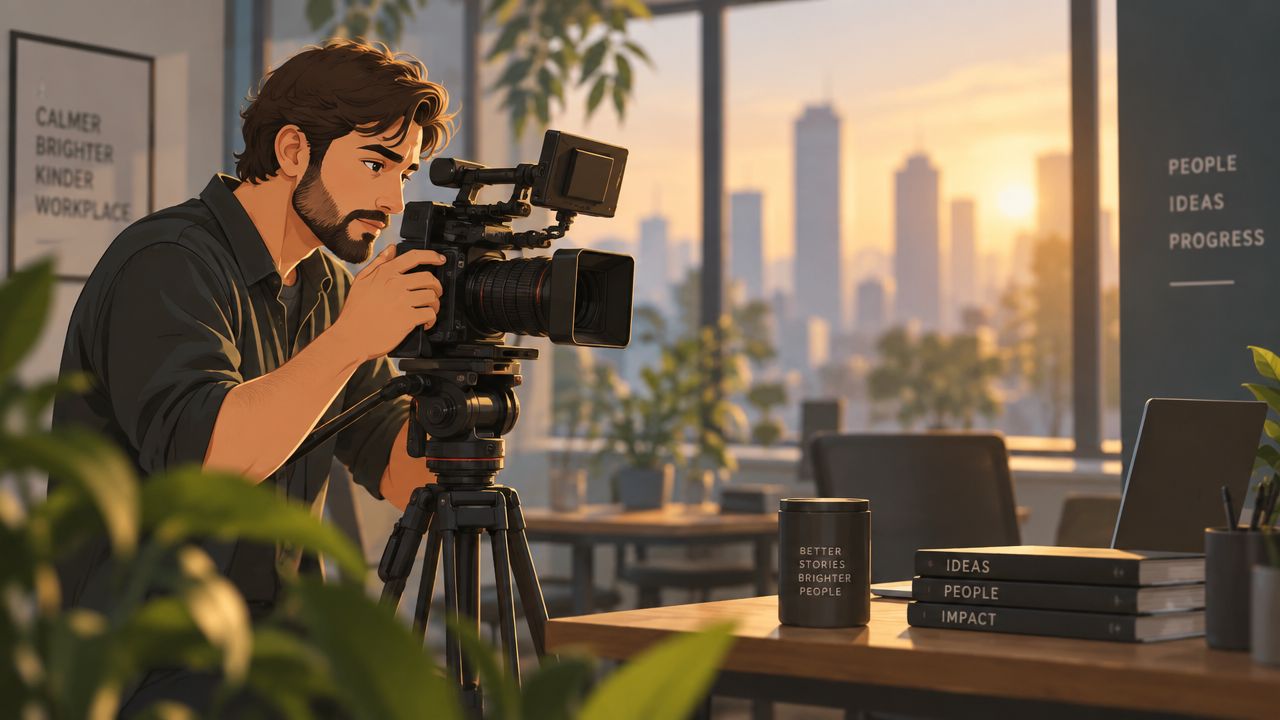
Authenticity comes from observation and control. A staged business video often feels artificial because every visual decision is generic, the subject has no natural behavior, and stock-style imagery substitutes for an actual environment. Realistic footage gives viewers specific details to notice, such as the way a team prepares a workspace, serves a customer, or solves a problem.
Stock assets can still help, but they need the same visual discipline as original footage. Guidance on using stock footage authentically emphasizes composition, focus, and standard lighting choices that make images feel intentional rather than decorative.
Three visual checks
Frame with purpose. The rule of thirds can place a speaker slightly off-center while leaving visual space for captions or supporting graphics. That space should serve the edit, not exist by habit. A subject looking toward the open side of the frame often feels more natural than a face pressed against an edge.
Control focus deliberately. If everything is equally sharp, the image can feel flat and busy. Focus control directs attention toward the speaker, product, or action that matters. The effect doesn't need to be dramatic. The important point is that the viewer should know what to look at.
Shape the light. A basic three-point arrangement uses a key light as the main source, a fill light to soften harsh contrast, and a back light to separate the subject from the background. The setup can be subtle. It should make the face readable while preserving the character of the room.
Treat sound and compression as part of the look
Viewers often forgive a simple image before they forgive unclear speech. Record close enough for a clean voice, monitor the room, and listen for air conditioning, traffic, reflections, and clothing noise. A professional image paired with weak audio still feels unfinished.
Codec choices affect storage, upload time, and delivery cost. Modern benchmarks commonly show HEVC or H.265 at about 50% of H.264's bitrate for comparable quality, while AV1 can reach roughly 35% of H.264 at similar targets such as VMAF 93 (codec comparison benchmarks). Those comparisons only make sense when resolution, chroma sampling, bit depth, and frame count stay fixed. Newer codecs can reduce bandwidth and CDN demands, but they also require compatible decoders and more processing, so delivery needs should guide the choice.
Producing Video at Freeform House in Jenks
A recurring video plan needs more than a good camera. It needs a place where the team can arrive, set up, record, reset, and return later without fighting the same logistical problems each time. Freeform House is envisioned as a premium, membership-based club in the heart of Jenks, Oklahoma's 10 District downtown, with the atmosphere of a SoHo House-style social and work hub.
The restored 1920 building covers roughly 10,000 square feet across three stories and combines coworking, meeting, dining, community, and creative facilities. For a local business, that combination changes the production equation. The location can support a branded shoot, an interview, an executive message, or an event-related recording without requiring the company to convert its own office.
Matching spaces to production jobs
The Rise loft studio provides a controlled setting for brand photography, short-form video, product demonstrations, and campaign assets. A business can keep the visual background consistent across a series instead of improvising in different offices.
The in-house podcast booth supports interviews, educational episodes, and client conversations where clear speech matters most. A subject-matter expert could record a longer discussion, then turn the strongest answers into short clips for a marketing calendar.
The four member rooms, the Hall of Fame Room, Freeform Room, Executive Room, and Thomas Room, offer distinct settings for corporate videos, leadership messages, workshops, and event coverage. The room choice can change the tone without moving the production to a new building.
Why the venue model helps consistency
Traditional production often loses time to space, equipment, furniture, sound, lighting, and food logistics. A membership club and workspace can bring those needs into one operating environment. Local restaurant and coffee shop partnerships can provide meals and beverages on demand at no extra delivery cost, which makes a full shoot day easier to manage for the crew and participants.
The operational advantage isn't that every video should look the same. It's that the business can build a familiar production routine. A team can return to a known room, refine its setup, record several related pieces, and maintain a coherent visual identity. Businesses exploring the practical details of a video shoot location can use that kind of venue planning to reduce friction before the camera comes out.
Your Booking and Production Day Checklist
A first project doesn't need to become a large campaign. It needs a clear purpose, a controlled setting, and enough planning to produce more than one useful asset.
Two weeks before the shoot
Write the business objective. State what the viewer should understand and what action you want next. “Create a video” is too broad. “Introduce our renovation consultation process” gives the producer something to plan around.
List every deliverable. Decide whether you need a website video, vertical clips, interview excerpts, podcast audio, captions, or still frames. This affects framing, recording time, and the shot list.
Choose the production model. Decide which tasks stay in-house and which require a freelancer, editor, audio specialist, or agency. Confirm who owns approvals and who gives consolidated feedback.
Book the room and participants. Check the venue's access hours, sound conditions, available light, furniture, power, and catering options. A room that looks good in a photograph still needs to work for camera placement and conversation.
Before and during production
Lock the script and shot list. Include the main interview, alternate phrasing, demonstrations, environmental details, and quiet cutaway footage. These choices give the editor room to shape the story.
Set audio correctly. Lock the camera, recorder, and editing project to 48 kHz and 24-bit unless the final specification requires another setting. Confirm that every device uses the same plan.
Check the frame and light. Look for distracting backgrounds, harsh windows, reflections, and unwanted shadows. Use the key, fill, and back light approach as a starting point, then adapt it to the room.
Capture multiple uses in one setup. Record a full answer, a shorter version, a natural reaction, and supporting actions. Don't force the speaker to repeat the same line endlessly. Change the question or context so the delivery stays human.
After filming
Give the editor organized feedback. Review one cut at a time, identify exact timecodes, and separate factual corrections from personal preferences. A focused review round protects the schedule.
Approve platform-ready exports. Check captions, names, logos, audio clarity, framing, and playback on the intended channels. Keep a high-quality master and label the shorter versions clearly.
Start with one well-planned shoot this month. A useful interview, a few supporting scenes, and a thoughtful set of cutdowns can teach your team more about its content needs than a large campaign built without a process.
Freeform House offers members a Jenks setting with coworking rooms, The Rise loft studio, an in-house podcast booth, and spaces for meetings, events, and business content. If you want to plan a repeatable professional video production day without building a studio from scratch, visit Freeform House and explore whether the space fits your next shoot.
Comments